Unlock Creative Possibilities with the Halloween Spooky Icon Vector Bundle Set
The Halloween Spooky Icon Vector Bundle Set is a versatile and visually striking collection designed to bring a festive and eerie vibe to your creative projects. Whether you're a graphic designer, marketer, educator, or DIY enthusiast, this bundle offers a wide array of Halloween-themed icons that are both expressive and easy to use. With its bold and clean silhouette style, the set captures the essence of Halloween while maintaining a professional and modern aesthetic.
What’s Included in the Halloween Spooky Icon Bundle?
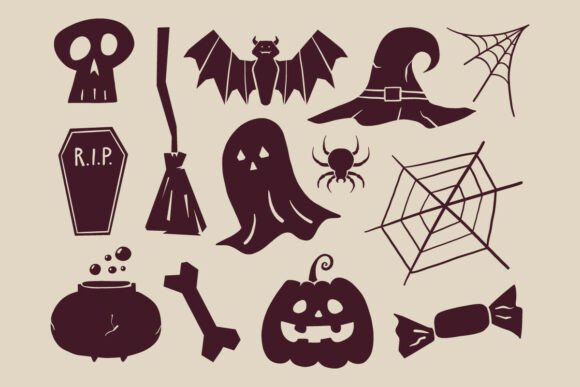
This comprehensive icon set features a variety of classic Halloween elements, each designed with simplicity and clarity in mind. The bundle includes:
- Ghosts – Friendly or frightening, perfect for a range of themes
- Pumpkins – Ideal for fall and Halloween decorations
- Bats – Great for creating a spooky atmosphere
- Witch hats – Essential for magical or mystical designs
- Skulls – Adds a bold, edgy touch to any layout
- Spiders and webs – Perfect for eerie, haunted visuals
- Brooms – Classic Halloween accessory for witches and haunted scenes
- Candy icons – Useful for Halloween party materials or trick-or-treat promotions
- Other seasonal objects – Including tombstones, cauldrons, and more
Each icon is designed in a silhouette style that balances minimalism with expressiveness, ensuring they are instantly recognizable while remaining adaptable to different design styles and color schemes.
Why Choose the Halloween Spooky Icon Vector Bundle?
There are several reasons why this icon bundle stands out among other Halloween-themed design resources:
- Versatile Design – The bold and clean style makes these icons suitable for both digital and print media, from website graphics to party invitations.
- Multiple File Formats – The bundle includes SVG, PNG (with transparent backgrounds), EPS, and JPG files, ensuring compatibility with various design software and uses.
- Scalable Vector Graphics (SVG) – These files can be resized without losing quality, making them perfect for everything from mobile app icons to large posters.
- Transparent Backgrounds (PNG) – PNG files allow for seamless integration into any background, giving your designs a polished and professional look.
- Professional Vector Editing (EPS) – Ideal for advanced users who need to tweak or customize the artwork for high-end projects.
- Preview Images (JPG) – Useful for quick reference or sharing design concepts with clients or team members.
Practical Uses for Halloween Icons in Design Projects
Whether you're working on a personal craft project or a commercial design, the Halloween Spooky Icon Vector Bundle offers countless creative applications. Here are just a few examples:
1. Party Decorations and Invitations
Create eye-catching Halloween party flyers, banners, and invitation cards using these icons. Ghosts, pumpkins, and witch hats can be combined with bold fonts and dark color palettes to set the perfect spooky tone.
2. Website and App Graphics
Enhance your website or mobile app with seasonal flair. These icons are perfect for adding Halloween-themed buttons, banners, or interactive elements to user interfaces.
3. Educational Materials
Teachers and educators can use these icons to create engaging Halloween-themed lesson plans, flashcards, or classroom decorations that resonate with students.
4. Marketing and Promotions
Businesses can leverage these icons for seasonal campaigns, such as Halloween sales, themed product packaging, or social media graphics that grab attention and drive engagement.
5. Print-on-Demand Products
Designers selling on platforms like Etsy, Redbubble, or Amazon can use these icons to create Halloween-themed apparel, mugs, stickers, and more, without worrying about image quality or copyright issues.
How to Get the Most Out of Your Icon Bundle
To maximize the value of the Halloween Spooky Icon Vector Bundle, consider the following tips:
- Experiment with Color – While the icons are provided in a silhouette style, you can easily recolor them to match your brand or project theme using vector editing tools.
- Combine Icons for Unique Scenes – Layer multiple icons (like a ghost, moon, and bat) to create mini illustrations or themed backgrounds.
- Use Consistent Styles – Stick to one file type (like SVG or PNG) throughout a project to maintain visual consistency and avoid pixelation.
- Optimize for Web – When using icons on websites, compress PNG files for faster loading times without sacrificing quality.
- Customize with Text – Pair icons with catchy Halloween phrases or event details to make your designs more informative and engaging.
Understanding the File Types Included
Each file format included in the bundle serves a specific purpose, and understanding their uses can help you work more efficiently:
- SVG (Scalable Vector Graphics) – Best for digital use where scalability is important. SVG files can be edited with tools like Adobe Illustrator or Figma and are ideal for responsive web design.
- PNG (Portable Network Graphics) – Offers high quality with transparent backgrounds, making them great for overlays, logos, and graphics that need to blend into different backgrounds.
- EPS (Encapsulated PostScript) – A vector format preferred by professional designers for high-resolution printing and detailed editing.
- JPG (Joint Photographic Experts Group) – A standard image format used for previews and general sharing. While not ideal for editing, JPGs are perfect for quick reference or showing clients a preview of your design.
Common Misconceptions About Icon Bundles
While icon bundles like this one offer tremendous value, there are some common misconceptions to be aware of:
- “All icons are the same.” – While many Halloween icons exist online, the quality, style consistency, and file flexibility can vary greatly. This bundle offers a cohesive, professionally designed set tailored for creative versatility.
- “You need advanced skills to use vector files.” – While SVG and EPS files are powerful for professionals, they can also be used by beginners through drag-and-drop design tools like Canva or Adobe Express.
- “Free icons are just as good.” – Free icons often come with licensing restrictions, lower quality, or inconsistent styles. Investing in a premium bundle ensures you get high-quality, well-structured, and legally safe assets.
Conclusion: Elevate Your Halloween Designs with a Premium Icon Bundle
The Halloween Spooky Icon Vector Bundle Set is more than just a collection of festive graphics—it’s a powerful toolkit for designers, marketers, educators, and creators of all kinds. Its combination of clean, expressive silhouettes and multiple file formats ensures that you can use these icons across a wide range of projects with ease and professionalism.
Whether you're designing a spooky poster, a themed website, or a fun educational worksheet, this icon set helps you convey the spirit of Halloween in a way that’s both visually appealing and functionally versatile. By investing in a high-quality, well-structured icon bundle, you not only save time but also elevate the quality of your creative output.
So this Halloween season, don’t settle for generic or low-quality graphics. Unlock the full potential of your designs with the Halloween Spooky Icon Vector Bundle Set and bring your creative ideas to life with style and ease.